
TABLE OF CONTENTS
- Beta Notice
- What is the Questel Services Portal (QSP) Integration
- How to Launch a new Estimate or Direct Project
- Notes per Service Type
- EP Validation
- View your Estimate or Project Details
- How to Receive Deliverables
- How to Contact
This feature is currently in beta, which means we're still refining it. You may encounter occasional bugs or limitations while we continue improving the experience.
Known Limitations
- Available for Matters in Equinox where Category = Patent only
- Ability to order or estimate Translations services or EP Validations. Not available for PCT Filing, Direct Filing, or EP Grant
- Special instructions can only be entered upon submitting a direct project, not on conversion from estimate to project
- An estimate cannot be edited to add/remove jurisdictions, please create a new estimate
- Fields like status and filing deadline could take about a minute to populate, and the page must be refreshed
- Any Requested Deadline is available for selection without consideration for Statutory Deadline
- Status and Deliverables remain connected to the main Equinox Matter on which the Services order was placed, without connection to country-specific validation Matters.
- There are multiple areas where “jurisdictions” is mistakenly used instead of the correct “target languages”.
- On 71(3) Claims Translation workflow:
- The term “Jurisdictions” is erroneously used in the UI (e.g. it will say France and Germany, though it is 71(3) claims for EP).
- Total words displayed in UI is the full specification. The estimate and word count indicated in the estimate is correct, and interaction with the Services team is the claims word count.
- If adding translation for EP Validation service to a 71(3) Claims workflow, the details displayed in Equinox UI remain associated with 71(3) Claims translation service, including the Confirmation of Requested Services page and the Details page. For example, the target languages listed will remain as French and German, and not include any translations required for EP Validation. The details captured in the PDF estimate are accurate and that is what will be processed by the Services Team.
Help Us Improve
If you run into issues or have suggestions or any general comments, we'd love to hear from you. You can submit feedback through support@equinox-ipms.com. Please include “QSP” in the subject or title.
The Questel Services Portal (QSP) Integration allows you to get instant estimates, place orders, and receive status updates and deliverables of your translation and EP Validation services with Questel’s Services team without leaving Equinox.
Obtain and Enter Credentials for Services
To use this integration, your account Admin must first obtain your unique API key and Client ID for the QSP. Reach out to support@equinox-ipms.com to start this process.
- You will need to provide the contact names and emails for team members that will use this functionality.
- You will then be provided with an API Key and Client ID. The API key is a unique password that allows the Equinox Software to talk to the Questel Services Portal software safely.
- The API key will be sent to you from gateway-integration-support@questel.com for you to enter in Equinox. An API key should be kept secret. If someone else gets it, they can use the service as if they were you, which can lead to security issues or unexpected charges.
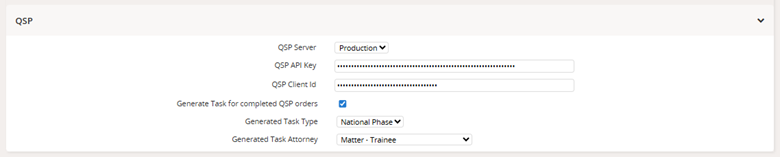
To enter these credentials, go to System > System Preferences > Questel Services:

Under QSP section:
- QSP Server: Production
- QSP API Key: as provided by gateway-integration-support@questel.com
- QSP Client Id: as provided by gateway-integration-support@questel.com
- Generate Task for completed QSP orders: check this box if you’d like a task to be generated upon completed order
- Generated Task Type: The type of task created upon completed order
- Generated Task Attorney: User to associate to task
Check that the necessary user permissions are configured. The User will need at minimum:
- Services > Read – to view the Services tab
- QSP > Create – to create estimates and place orders through this integration
- QSP > Delete – the cancel estimates and orders through this integration

For more on permissions, see System Permissions.
Once configured, you will see:
- a new Services tab across the top bar

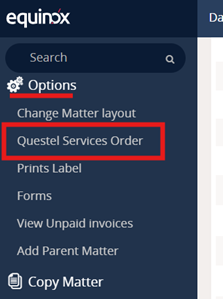
- a new selection Questel Services Order in the left bar under Options available on Matters with Category = Patent only.
You can launch a new estimate or direct project in two ways:
- Left bar under Options, click on Questel Services Order (available on Matters where Category = Patent).
- Services > Translations and EP Validations to see the dashboard of QSP requests. From the dropdown menus at the top left

Select New Estimate or Project from the dropdown menus, along with your desired Service Type, Translation or EP Validation, and select Create.
Note that all Translation and EP Validation projects with Questel are subject to Questel’s Standard Terms and Conditions.
For all submissions, request for estimate or direct project:
- you can optionally provide a Name that is for your records and easy identification
- you must select source language and either target language or jurisdiction depending on the type.
- when submitting a direct project (not an estimate), you must also select your Requested Deadline and optionally enter any Special Instructions for the services team.
- for Types requiring documents, the dropdown will display .docx files uploaded to your Matter. You can select one or multiple .docx files.
- An estimate will be created, and both a PDF and xlsx file of that estimate will be available on the Details page and in the Documents tab of the Matter
There are five Translation Types available. 71(3) Claims, Direct Filing, EP/UP, PCT National, and Other
71(3) Claims
You must have a valid application or publication number on the Equinox Matter before starting the estimate or project request, else you will receive an error upon submission.
In addition to translations for the purpose of 71(3) claims, you can add translation for EP Validation service by ticking the corresponding box and selecting jurisdictions. This is translation only, not the EP Validation service. If ticked, then some top-level controls, like converting the estimate to a project, will apply to both services.
Direct Filing
Attaching documents is required.[HC1] The documents must be uploaded to the Documents tab of the Matter and in .docx format first.
EP/UP
You must have a valid application or publication number on the Equinox Matter before starting the estimate or project request, else you will receive an error upon submission.
PCT National
You can attach documents for translation for PCT National as needed, but it is not required[HC2] . The documents must be uploaded to the Documents tab of the Matter and in .docx format first.
Other
Select the Translation Quality based on your intended use: Publication or Reference.
This service consists of EP Validation and any required translations.
You must have a valid application or publication number on the Equinox Matter before starting the estimate or project request, else you will receive an error upon submission.
When submitting a direct project (not an estimate), you can submit Special Translation Instructions and Special Filing Instructions, each visible for the team responsible for that respective service.
Upon submission of an estimate or project, you will be taken to the Details page. You can also access the Details page at any time in two ways:
- Navigate to Services > Translation and EP Validations to view the dashboard containing the list of all estimates and projects, then filter as needed and select.
- On a Matter with a submission, from the Details tab, in the top right you will see “Active Questel Service Orders” and you can click “View Orders”. This will take you to the Translations and EP Validations dashboard filtered for your matter, then click into the name.
From the Details page, you can:
- View the details at time of submission and project live status
- View charges per jurisdiction or language
- Download a PDF or excel version of the estimate
- Click “View on QSP” to access the estimate or project directly in the Questel Services Portal. Note that any actions taken on the QSP may not be reflected in Equinox.
- For Estimates, enter your requested deadline and convert the estimate to a project
Delivery files, translations and/or filing receipts, will be available on the Project Details page and on the Documents tab of the associated Matter as soon as the Services team makes them available.
If any questions or concerns related to any translation or EP Validation service as ordered through this integration, the quickest route to resolution is to contact the Services team directly at patentorders@questel.com.